Character replacement / Nexus Mods

Minato Aqua

A Minato Aqua character replacement for Desktop Mate. This page documents the original Nexus listing, real preview, loader requirements, and safe removal without re-hosting the author's file.

Independent fan resource. Not affiliated with, endorsed by, or sponsored by infiniteloop Co., Ltd., Valve/Steam, or any character rights holder.
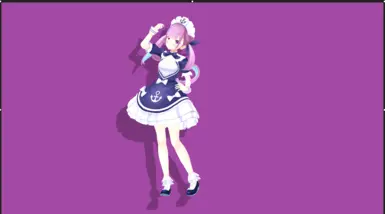
Minato Aqua Desktop Mate mod preview uploaded by Neko on Nexus Mods.
Real Minato Aqua previewUploaded by Neko on Nexus Mods
Nexus model

Original page available

The file is controlled by its Nexus uploader. Nexus requires an account for manual downloads, so this site does not promise a public direct file URL or mirror the archive.

Version
1
Uploader
Neko
Updated
Type
Character replacement
Download
Nexus login required
Virus scan
Check live listing

WHAT THIS PAGE VERIFIES

Minato Aqua source and preview

A Minato Aqua character replacement for Desktop Mate. The image shown here is the actual thumbnail published on Nexus Mods for item 54; it is not AI-generated art, a stock image, or a different character presented as this mod.

This is a third-party character replacement, not official Desktop Mate DLC. The character, source model, textures, and franchise can have separate rights owners, so downloading a file does not grant redistribution or commercial-use rights.

Minato Aqua character model preview from Nexus Mods.
Original Nexus Mods preview uploaded by Neko.

REQUIREMENTS

What you need before installing

  • Desktop Mate installed from Steam and launched once.
  • A compatible legacy avatar-loading method documented by the model author.
  • Windows, unless the original page explicitly documents another platform.
  • A Nexus Mods account to access the Files tab.
  • A rollback copy or Steam file verification plan.

How to install Minato Aqua

  1. Open the original Nexus description and Requirements sections before downloading.
  2. Confirm which avatar loader and Desktop Mate version the uploader used. Do not assume a current loader is interchangeable.
  3. Sign in to Nexus Mods, open the Files tab, and select the uploader's current main file.
  4. Scan the downloaded archive without disabling Windows Security or another trusted scanner.
  5. Follow the uploader's folder path exactly. Do not overwrite unrelated DLC or Steam files unless the original instructions explicitly explain the rollback.
  6. Launch once and test the character before installing another model.

Desktop Mate compatibility

The Nexus listing identifies this as version 1, last updated 2025-03-12. It does not make the model official or guarantee that it works with the current Desktop Mate Steam build. Avatar loaders and the game assemblies they depend on have changed over time.

Official Desktop Mate settings shown on a desktop.
Official product context: test the unmodified base app and keep a known-good settings state before adding a model.

Download and redistribution permissions

Nexus Mods requires login for file downloads. Many Desktop Mate model pages explicitly prohibit uploading the file to another site. That is why this guide links to item 54 instead of copying its archive. Review the live Permissions and credits section before sharing, editing, converting, streaming, or using the model commercially.

How to remove the model

Exit Desktop Mate. Remove only the files added for this model or restore the loader's previous model path. If the base app does not start, remove the third-party loader and use Steam > Desktop Mate > Properties > Installed Files > Verify integrity. Keep personal VRM or model files outside any folder Steam may replace.

Troubleshooting

  • No download starts: sign in to Nexus Mods and use the Files tab; a public stable direct link is not available.
  • Character does not appear: verify the required loader, app version, archive layout, and model format on the original page.
  • Desktop Mate stops launching: remove the model and loader first, then verify the base app through Steam.
  • Preview differs in game: the uploaded thumbnail can show a pose or render that does not represent every animation in Desktop Mate.

Minato Aqua FAQ

Can I download Minato Aqua directly from this site?

No. The original file is distributed through Nexus Mods, which requires login and preserves the uploader's permissions and file history.

Is this an official Desktop Mate character?

No. It is a community character replacement and is not official DLC from infiniteloop.

Does it work with the latest Desktop Mate?

The original listing does not provide a current-build guarantee. Check its description, requirements, posts, and update date before installing.

Sources and verification

Listing metadata and preview checked on 2026-07-22. Use the original page for live permissions, scan results, and file revisions.

RELATED CHARACTER MODELS

More Desktop Mate model pages